

This is meant to be a step by step mini-guide “Money Saving Machines” for anyone to follow. With some simple steps I managed to save around $6,000/yr on website builders, hosting.
Yes, I was paying around $6,000/yr across Squarespace, Framer, Webflow, Wix, Hostinger. Different sites, different tools, different bills.
This is a counter I created in my website orlandopedro.com that measures live how much cost I’m saving by building my own stuff.
A reverse money saving machine 3d software printer thanks to AI.

None of them are bad products, but the only reason why websites builders existed is because coding a website used to be hard. That’s gone. And this can prove it.
So to me website builders (and no-code tools) are Dead really dead, but they might not know it yet. Framer, Webflow, Squarespace, Wix, game over.
Here’s what the market actually looks like right now.
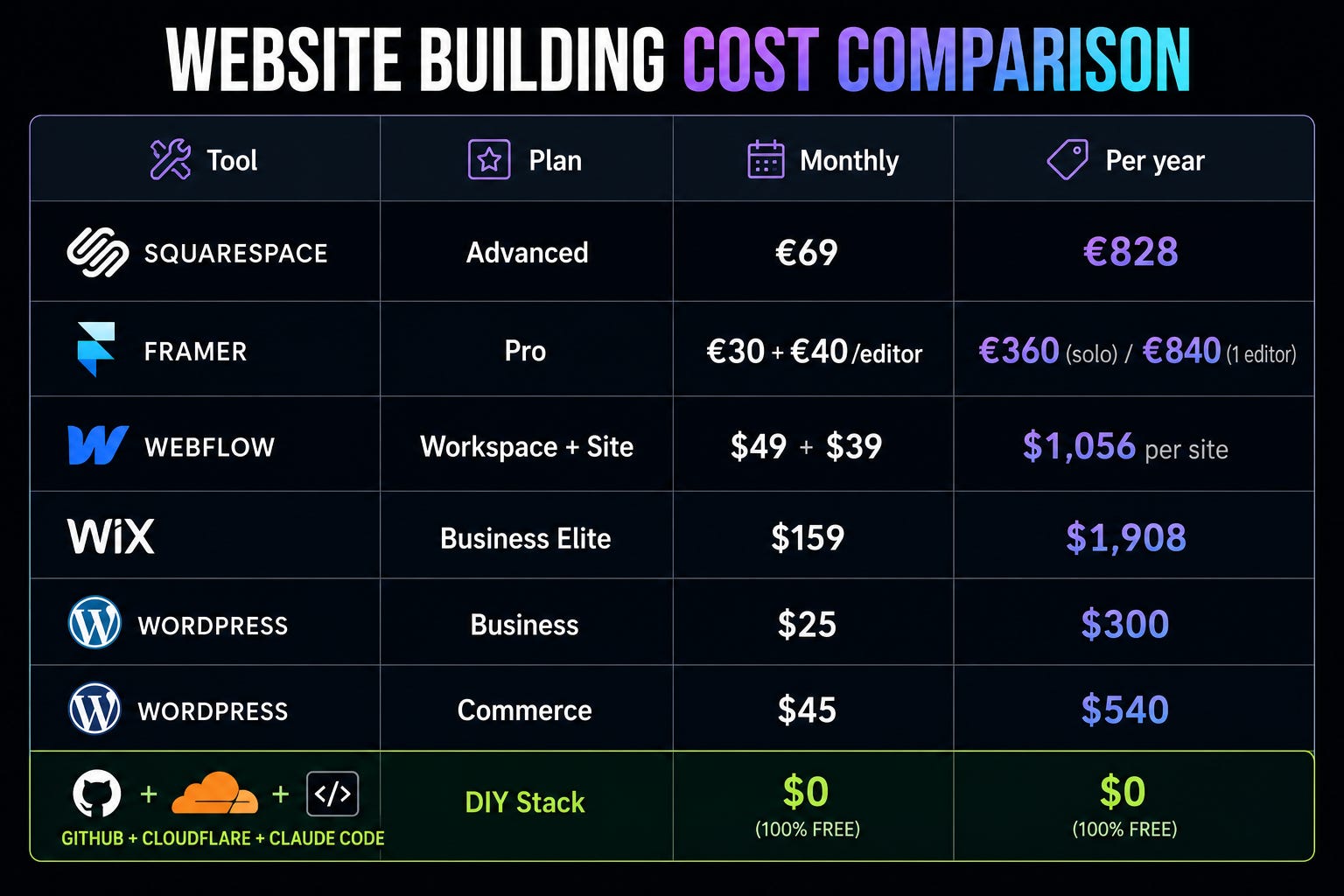
I think I can take it to $20,000/yr by the end of the year expanding to more subscriptions and products. Not only personally but extending this to the projects that I have that are 🔥🔥🔥🔥.
And I will keep building this mini-guide on how to do it.
Goes without saying that if we apply this kind of "replacement logic” to a company, a team, etc the gains are exponential, form a couple of hundred to millions.
One Webflow site of mine with with a one seat workspace runs over $1,000/year. Wix Business Elite is nearly $2,000. Add a Squarespace site and a Framer site with one editor and you’re at €2,500+ before you’ve shipped anything.
We’re paying for a UI that builds a website for you because we couldn’t. Now we can. Or more accurately, Claude can, and we’re driving.
That’s the whole thing. Technology has to be invisible to the user.
Those tools made themselves very visible, expensive, and in the way, to solve a “user can’t code issue”.
The new stack disappears, now we don’t need to code, just talk.
What you need
5 things, assuming you already own a domain.
Free GitHub account sign up, done. Free forever for what we’re doing.
Free Cloudflare or Vercel account. Free tiers.
A subscription to any AI service. I recommend Claude, because we will use Claude Design for this
Visual Studio Code installed on your computer
Claude Code installed in your VS Code (super easy, Google it, takes 2 minutes)
Open VS Code, go to extensions, search “Claude,” install. Authenticate with your Claude account.
If any step trips you up, paste it into Claude and ask for help. It will walk you through it.
The recipe: 14 easy steps
Today you can use this exact 14 easy steps recipe to build and deploy any website for free. This will remain true for 99% of the use cases, and it’s free to deploy, free to maintain, the only cost for now will be the payment for the domain renewal.
And to be honest, I haven’t looked into that yet, but with $2,000/yr in domain renewal that’s next.
1. Find inspiration on Pinterest
I think 5 images is enough (or your own website). Search “e.g website landing,” “UX UI design,” “personal site,” whatever fits your vibe. Save them.
2. Use AI to research yourself
Open Claude (or any AI). Feed it everything about you or your brand or whatever. LinkedIn, projects, what you do, sell etc. Then ask:
Create an MD file with the structure and copy of my page.
You’ll get a clean markdown file with sections and text written in your voice. Save it.
3. Turn the inspiration into instructions
Paste your 5 Pinterest images into the same chat. Ask:
Create full instructions for a web AI developer, in markup, based on these references.
You now have a design brief.
4. Generate visual alternatives
Go to Claude Design. Paste the MD file and the design brief. Ask for 5 completely different visual alternatives. Let it cook.
5. Pick one and lock it
Choose the version you like. Ask Claude Design
Design to generate it into the folder `/website/home.html`.
6. Get the handover files
Ask Claude Design to give you the full handover for Claude Code. Decompress the files. Save them all in one folder on your computer.
7. Open in VS Code
Open VS Code, open the folder. Ask Claude Code:
Read this folder and build everything. Astro with HTML preferred for static sites and SEO. Match the design 1:1.
(Astro because static + SEO + zero JS overhead. Same recipe works with Next or plain HTML if you don’t care about a framework.) « if you don’t get this is ok, paste to any Ai to guide you
Then wait and wait. It will scaffold(build) the project, write the code, install dependencies.
8. Run it locally
When it’s done, ask:
Can you run it locally for me?
Or just “npm run dev” in a terminal. It will give you a local URL like `http://localhost:5555`. Open it. Look at your site. Make sure it’s right.
9. Create a GitHub repo
Go to GitHub, create a new repository, set it to private. Name it whatever.
10. Sync to GitHub
Back in VS Code, ask Claude Code to sync the project to GitHub. It will guide you through auth, give it access, that’s it.
11. Finish the first deployment
Say yes to everything Claude asks. Don’t worry about branches or pull requests yet. Just get the first version up.
12. Create a Cloudflare Pages project
Open Cloudflare. Create a new Pages project. Connect it to your GitHub repo. If you get stuck, paste this whole post into ChatGPT or Claude and ask it to guide you. It will, click by click.
13. Point your domain
Update your DNS records to point your domain at Cloudflare. Two minutes.
If you don’t know how, paste this into any AI and it will walk you through it for your specific registrar. Paste this
Guide me how to move my DNS nameservers to Cloudflare free plan to deploy some pages with them. Including backing up DNS settings in teh old just in case in a cvs
14. You’re live
Once DNS propagates, your site is live. For $0/year. Forever(*), as long as you stay on the free tiers, which you will.

*Cloudflare has a free tier with 100K visits per day. They might change this in the future.
What you(me) actually gained
I created a counter in my own website orlandopedro.com with all the saving so far:
~$6,000/yr back and counting
Full ownership of your code, your site, your data
No platform telling you what discovery policy applies to you
No CMS lock-in
Faster site, better SEO, because it’s static
Anyone can do this in a weekend
The old way is dead. The future is in our hands now, it’s up to us to see how far we can take these tools